Showing posts with label Windows. Show all posts
Destroy Windows 10 Spying [DWS Lite] 1.6 Final

Destroy Windows 10 Spying [DWS Lite] 1.6 Final

Destroy Windows 10 Spying
Destroy Windows 10 Spying (also called DWS Lite) is a powerful portable software that can block and stop Windows 10 from spying on you. DWS Lite is a simple and tiny software that can block anonymous data being sent by windows 10. It can securely remove Windows 10 metro apps that can not be removed using standard uninstaller (Program and Features) such as Mail, Maps, Calendar, Film TV, 3D Builder, Camera, Photos, and so on. In additions,
Destroy Windows 10 Spying 
also allows you to disable windows defender, disable spy apps and tasks, disable private settings, delete windows keylogger and telemetry and much more. Destroy Windows 10 Spying is the safest way to stop windows 10 from spying on you, the steps are very intelligent and not destroy your system.
Key features:
  • Very fast and easy to use
  • Removes Windows 10 metro apps
  • Disable private setrings
  • Disable windows defender
  • Remove keylogger and telemetry
  • Disable spy apps and tasks
  • Support all editions of Windows 10
How to install?:
  • Disable your anti virus (for temporary)
  • Run (as admin) the software (DWS Lite)
  • Click on “Destroy Windows 10 Spying”#
  • #Other options found on “Settings” tab
  • Enjoy Windows 10 without Spying
Screenshots:
DWS Lite
Minimum Requirements:
  • Windows 10 (32-bit or 64-bit)
  • No special requirements
Download links:

How to Install NET Framework 3.5 in Windows 10

Windows 10 comes with .NET framework 4.5 pre-installed, but many apps developed in Vista and Windows 7 era require the .NET framework v3.5 installed along with 4.5. These apps will not run unless you will install the required version. When you try to run any such app, Windows 10 will prompt you to download and install .NET framework 3.5 from the Internet. However, this will take a lot of time. You can save your time and install .NET Framework 3.5 from the Windows 10 installation media. This method is much faster and does not even require an Internet connection. Here is how to install it.

To install .NET Framework 3.5 in Windows 10, do the following:

  1. Insert your Windows 10 DVD, or double click its ISO image, or insert your bootable flash drive with Windows 10, depending on what you have.
  2. Open 'This PC' in File Explorer and note the drive letter of the installation media you have inserted. In my case it is disk D:
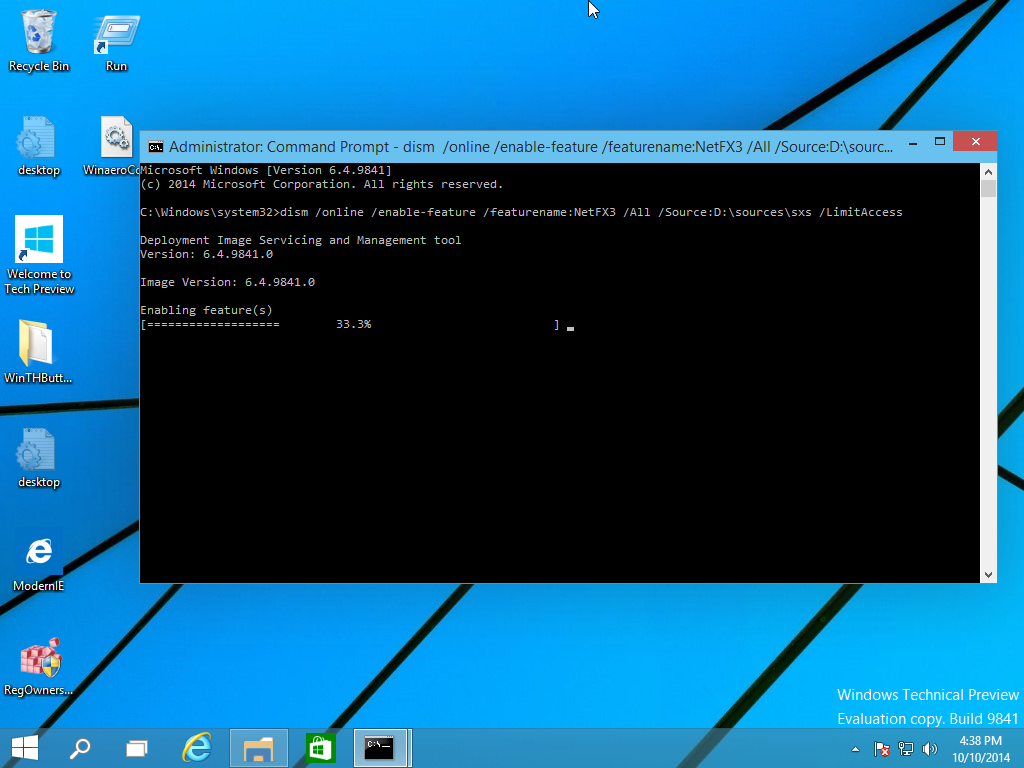
  3. Now open an elevated command prompt and type the following command:
  4. Dism /online /enable-feature /featurename:NetFX3 /All /Source:D:\sources\sxs /LimitAccess
    Replace D: with your drive letter for Windows 10 installation media.dism
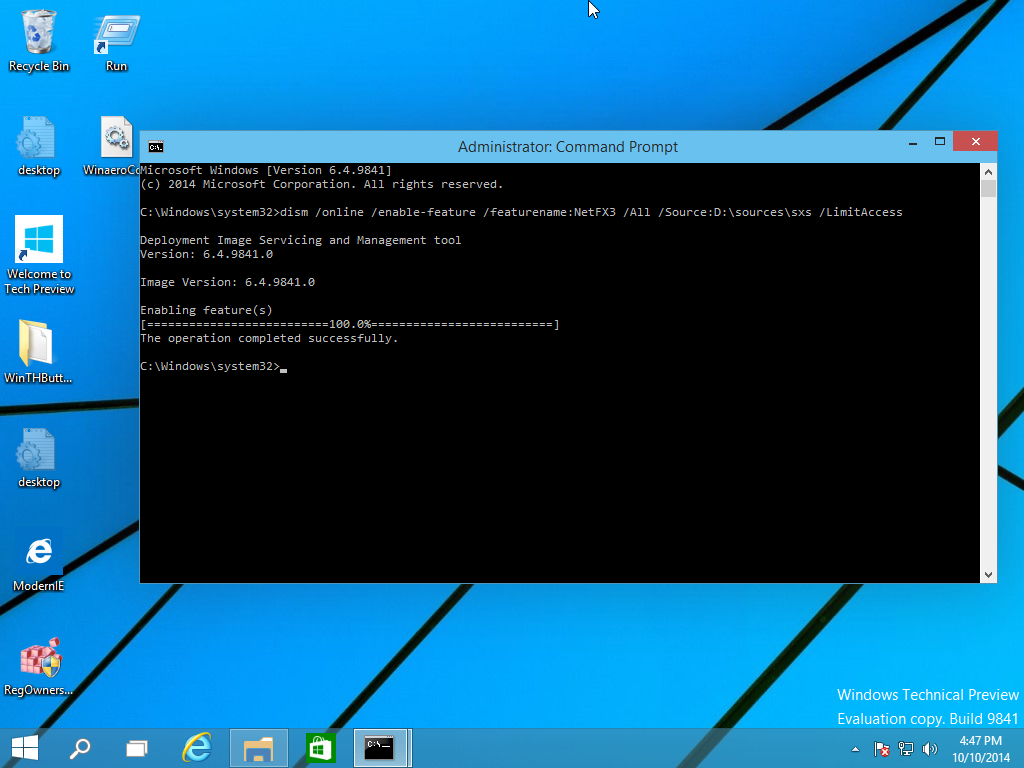
You are done! This will install .NET framework 3.5 in Windows 10.net installed seccessfully
To save your time, I have prepared a simple batch file which will save your time and will find the inserted installation media automatically. It looks like this:

@echo off
Title .NET Framework 3.5 Offline Installer
for %%I in (D E F G H I J K L M N O P Q R S T U V W X Y Z) do if exist "%%I:\\sources\install.wim" set setupdrv=%%I
if defined setupdrv (
echo Found drive %setupdrv%
echo Installing .NET Framework 3.5...
Dism /online /enable-feature /featurename:NetFX3 /All /Source:%setupdrv%:\sources\sxs /LimitAccess
echo.
echo .NET Framework 3.5 should be installed
echo.
) else (
echo No installation media found!
echo Insert DVD or USB flash drive and run this file once again. 
echo.
)
pause
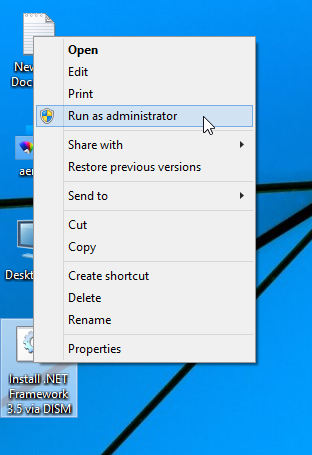
Download the file, extract it from the ZIP archive to the Desktop, right click it and choose Run as administrator. The file will install .NET Framework 3.5 automatically after finding the drive letter of your Windows 10 installation media.
run as administrator
Click here to download the batch file.

Windows 10 build 11082 ISO images

For Windows 10 build 11082, Microsoft doesn't provid official ISO images for clean install. If you're interested in installing this build from scratch, here are few links for you.


At the moment of this writing, Windows 10 build 11082 was released for Fast Ring Insiders only.  There are no official ISO images available.
Here are third party ISO images created from the official ESD files downloaded through Windows Update. You can download them with confidence.
Download Windows 10 build 11082 ISO images
Use the following link to download build Windows 10 build 11082 Pro x64 or x86.
Download
These ISO images were created using genuine Windows Update (esd) files and are not tampered with. Use them to install Windows 10 build 11082 from scratch on your virtual machine or on real hardware.


Generic key for Windows 10 RTM


There is a set of generic keys available for Windows 10 at this moment. These keys are as follows:
  • Windows 10 Home:
    TX9XD-98N7V-6WMQ6-BX7FG-H8Q99
  • WIndows 10 Pro:
    VK7JG-NPHTM-C97JM-9MPGT-3V66T
  • Windows 10 Home Single Language
    7HNRX-D7KGG-3K4RQ-4WPJ4-YTDFH
  • Windows 10 Enterprise:
    NPPR9-FWDCX-D2C8J-H872K-2YT43

Windows 10 Pro Build 10240


Windows 10 Pro Build 10240 free download full version. Get offline installer setup direct high speed download link of Windows 10 Pro Build 10240 for windows 32-64 bit. Download the official free ISO file. Windows 10 that was and is  the much discussed topic. Every Windows user exclusively wants this for his pc or android. Get offline installer setup direct high-speed ISO torrent download 32 /64 bit with Windows 10 activator.

Microsoft Windows 10 Pro  Build 10240 Review

Windows 10 is the most simplest and easiest of all windows till today. It is actually a blend and update ofWindows 7 and windows 8 with some entirely new features that are amazing to handles. The users would never leave the Windows. Windows 10 Pro Build 10240 has the ability to run not only on PC and smart phones, embedded systems, Xbox One, tablets, Surface Hub and Holo lens. For a sensible and a simple review, I would tell you that this version has been revised on a whole, whereas in most of the places you would realize some old feature. However, these old features have been given a new touch. You would get excellent and a new user experience. When I talk about the user experience this includes the design, performance and its features.The Windows Insider Program that is a global fans community who just love Windows. Insiders see the operating system in its earliest stages, and play a role in shaping it. This is the reason Windows 10 Pro Build 10240 seems almost problem-free.
Beginning the features from the very start, you would start to feel the amazing and new feeling. First of all the all new lock screen with increased security from 4 pins in Windows 8.1 to 35+ in Windows 10 (Pro+Enterprise). Moving on the welcome screen. Then you have got new themes that you would definitely love. The newest and the catchy thing is your Windows icon in the bottom left which would be clicked and the user goes into a whole new experience. The Start-up Menu is pretty useful as this has a mixture of windows 7 start-up and 8 as well. So, now no one is going to miss them. To the right of the windows icon you would see something new. Cortana, who’s our personal assistant lady who has got a beautiful voice. We tell her things that interest us and she would keep them in her mind. To our questions she would sometimes come up with amazing answers or refer to the Internet. She makes suggestions as well and does extra-ordinary things like she would sing you a song or a lullaby.. We are not over yet, no need to take your attention there, yes catchy (e) is for the Microsoft edge.
Windows 10 Pro Build 10240 Edge Download
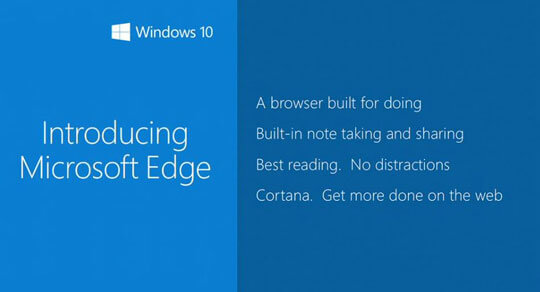
This has replaced the previous Internet Explorer with extra optimized performance provided to its users. There are numerous feature as the notification bar at the right in the task bar. The option that windows phone users enjoy is changing the theme colors & the task view.

Be aware of the removed features

The previously available features that got discontinued are:
  1. Windows Media Center
  2. Windows DVD player
  3. One Drive built-in sync client
  4. Your own choice to Updating Windows is finished.
Don’t Worry additions are better than these.

Key Features of Windows 10 Pro Build 10240

Here below are the main features of Windows 10 (Pro + Enterprise).
  • Iconic Start Menu
  • Windows 10 browser: Microsoft Edge
  • Windows 10 Store and Universal Apps
  • Windows 10 Hello and security
  • Continuum Mode
  • Enhanced Search
  • Desktop Optimizations
  • Multitasking
  • Enhanced Snap View
  • Multiple Desktops
  • Microsoft Passport
  • Multimedia and gaming
  • Windows 10 Cortana
  • Windows 10 office
  • Windows 10 defender (anti-virus)

Operating System Requirements

Here are system requirements of Full Windows 10 (Pro + Enterprise).
  • Supports 32-bit and 64-bit editions.
  • Windows XP, Windows Vista, 7, 8.1.
  • Hard Disk: 500 Free Disk Space.
  • Ram 2GB.
Screenshot
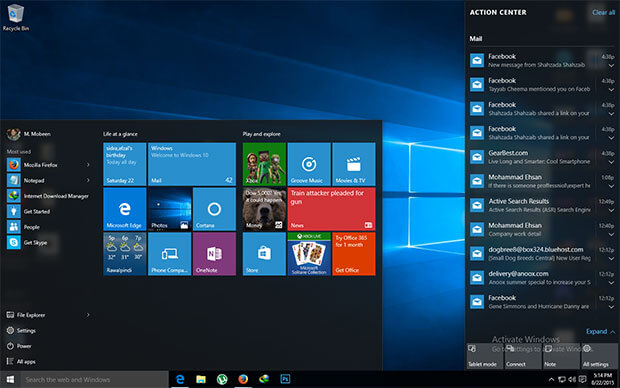
Windows 10 Final Build 10240 Start Atcion Center

Download

Create Windows 7 Bootable USB Drive From ISO File

Create Windows 7 Bootable USB Drive From ISO File

This tutorial will help you with the installation of Windows from image (.iso and .img) file using USB Drive. It is step by step method with pictures and screenshots. Without any CD/DVD. All you need is a USB flash drive of at least 4GB for Win 7 and 8GB for Windows 8 or 10. This article is a detailed 100% Working Guide. It covers these topics:
Windows 7 USB Flash Drive⇒ How to Create Windows 7 Bootable USB Drive
⇒ How to Install Windows 7 from ISO File
⇒ Windows 7 USB Installation Guide
⇒ Install Windows 7 on USB
When you download Windows from Microsoft Store or any online source, you download it as an ISO file. An ISO file combines all the Windows installation files into a single uncompressed file – like a DVD clone or backup. With ISO file so you can create (burn) a bootable DVD or USB drive containing Windows installation files.
Windows 7 USB Installation Guide
This allows you to install new Windows OS onto your PC. If you change the boot order of drives in your PC’s BIOS, you can run the Windows installation directly from your DVD or USB drive when you first turn on your computer. You can search for information about how to change the boot order of drives in your PC BIOS.

Windows 7 USB Installation Guide


You need Windows image file + ISO to USB burner software + USB flash drive to create Windows 7 USB Install Disk.


Download and Install Windows 7 USB/DVD tool

This is Microsoft’s genuine tool to make USB drive bootable. It can be downloaded here.
To install the Windows USB/DVD Tool, you must be an administrator on the computer on which you are installing the tool.
For 32bit Windows Users
Users who are running 32bit Windows need following file to burn (copy) 64bit ISO file on USB drive successfully.
bootsect.exe must be present in the same folder as the .iso file. It can be downloaded here.
For Windows XP Users
The following applications must be installed prior to installing the tool:
Microsoft .NET Framework 2.0  or higher must be installed. It can be downloaded here.
Microsoft Image Mastering API v2 must be installed. It can be downloaded here.

Create Windows 7 Bootable USB Drive From ISO File

After you have downloaded above Windows 7 USB tool. Now Make a USB copy of your Windows ISO file, using this Tool.
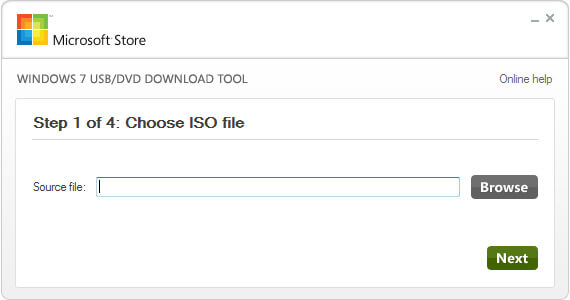
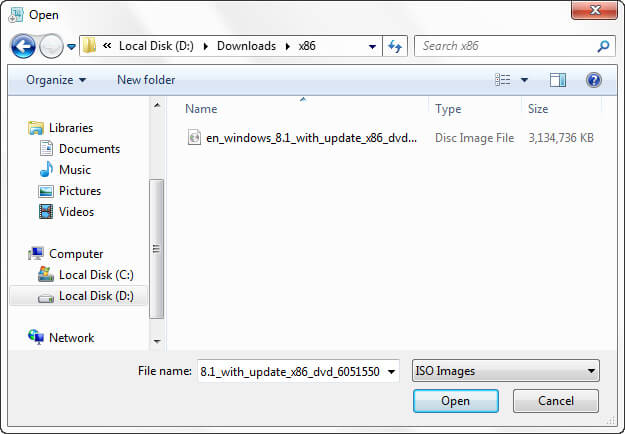
Step 1 – Open this tool from your programs. e.g Start ⇒ All Programs. Click on Browse button and go to path where your windows iso file is located. Select Windows 7 ISO file and click Open.
Choose ISO File
browse windows 7 iso file to open
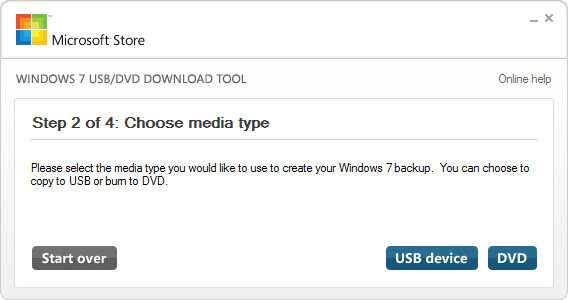
Step 2 – Click on USB Device as media type you would like to use to create windows 7 bootable USB drive.
Choose media type usb or dvd
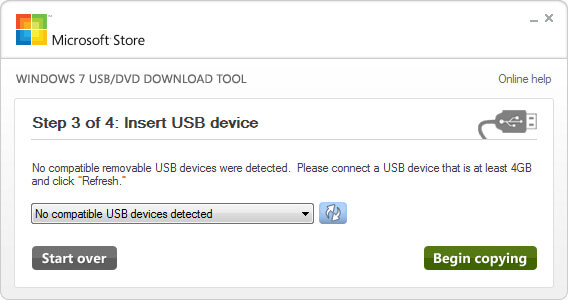
Step 3 – From Drop Down box select your USB Pen drive letter e.g. H: or I: or G: and then click Begin copying. After the process is completed the USB is now bootable. Turn off your computer and plugin USB. Now Turn on PC and boot from USB. Done.
Insert USB device
When your Windows ISO file is copied, install Windows by moving to the root folder of your USB drive, and then double-click Setup.exe
Install the Rufus Software and Open it. It can be downloaded here.
After you open it. Follow Below Steps:
  • Plug in your Pen Drive into USB Flash Port.
  • To make a Windows bootdisk (Windows XP/7) select NTFS as file system from the drop down.
  • Then click on the buttons that looks like a DVD drive, that one near to the checkbox that says “Create bootable disk using:”
  • Choose the XP ISO file.
  • Click Start, Done!

Windows 7 All in One ISO Free Download 32 / 64 Bit


Windows 7 All in one ISO Free Download in a direct link is available to the users of Softlay. It includes all Six Windows 7 Editions (Genuine ISO DVDs) with service pack 1 (SP1) from Official MSDN with the Windows 7 product key. Softlay gives the free single-click direct download of Windows 7 All in one ISO full version for both 32 bit and 64 bit. Download Untouched Windows 7 All in one ISO (SP1).


Windows 7 All in one ISO Free Download 32 / 64 Bit Review

Windows 7 All in one ISO Free Download is a collection of all Windows 7 OS editions released by the Microsoft listed below:
  1. Windows 7 Starter (OEM for low end 32bit PCs)
  2. Windows 7 Home Basic (Retail & OEM With basic features)
  3. Windows 7 Home Premium (Retail & OEM best for home users)
  4. Windows 7 Professional (Retail, OEM & VL for with networking)
  5. Windows 7 Enterprise (Volume license Pro edition + Languages)
  6. Windows 7 Ultimate (Retail & OEM with complete features)
These all are widely used and made available at retailers and Softlay.net is providing you all the versions at one place for the convenience of its users who can now enjoy features from all 6 versions ofWindows 7.  So if you are in need to optimize PC speed and getting the best performance you must be downloading All editions of windows 7 free full version software.

Key Features of Windows 7

  • Wide-ranging 6 editions
  • Effort-less Installation
  • Install it offline
  • Updated drivers
  • Superb desktop performance
  • All new experience of the task bar
  • More secure with the new Firewall

How To Install Windows 7 From ISO Image

After you successfully downloaded windows 7 ISO file. Save it on your PC. Follow this tutorial which tellsHow to install Windows All in One via USB Drive. The steps to install windows 7 are simple and easy. Comment here if you face any issues during windows 7 ISO download or installation.
Screenshot

Download

Free Windows 8.1 Download ISO 32 / 64 bit Official with Key

The Free Windows 8.1 Download ISO 32 / 64 bit Official direct link is now available on Softlay. Install Windows 8.1 Pro full version without going to the Windows Store or upgrade Windows 8 using Win8 key.


How To Install Windows 8.1 Official ISO

After you successfully download windows 8.1 free iso file. Save it on your PC. Follow this tutorial which tells How to install Windows 8.1 via USB Drive. The steps to install windows 8.1 are simple and easy. Comment here if you face any issues during windows 8.1 iso download or installation.

Operating System Requirments

  • Processor: 1 GHz or faster
  • Memory: 2GB
  • Hard disk space: 20GB available
  • Video card: 1366 × 768 screen resolution; DirectX 9 graphics processor with WDDM driver
  • Connectivity: Internet access (fees may apply)
Microsoft account required for some features. Watching DVDs requires separate playback software.

screenshot

Re-Loader v2.0 RC 3: Windows 10 & Office 2016 Activator

Re-Loader Activator
This is application the loader activation all versions of Windows and Office 2010, Office 2013, Office 2015 , Office 2016. You may thinking what to choose. Either Kmspico, Reloader or some other Activator. Simply use what you want. This tool is more light weight, but does what its intended to do : Let you use Windows and office products forever. Simple as that. Let us know when this worked for you. If you got an issue we got your back, simply comment below and we’ll be here to help you. Also more information is given below
The following versions of Windows can be activated with this Loader…
Windows XP
  • Home Edition SP3
  • Professional SP3
  • Media Center Edition 2005 SP3
Windows Vista
  • Enterprise
  • Enterprise N
  • Business
  • Business N
  • Starter
  • Home Basic
  • Home Basic N
  • Home Premium
  • Ultimate
Windows 7
  • Enterprise
  • Enterprise N
  • Enterprise E
  • Starter
  • Home Basic
  • Home Premium
  • Professional
  • Professional N
  • Ultimate
  • Embedded POS Ready
  • Embedded
  • Embedded Thin PC
Windows 8
  • Enterprise
  • Enterprise N
  • Core
  • Core N
  • Core ARM
  • Core Country SpecIFic
  • Core Single Language
  • Professional
  • Professional WMC
  • Professional N
Windows 8.1
  • Enterprise
  • Enterprise N
  • Professional
  • Professional N
  • Professional WMC
  • Core
  • Core Connected
  • Core Connected N
  • Core Connected Single Language
  • Core Connected Country Specific
  • Professional Student
  • Professional Student N
  • Core ARM
  • Core N
  • Core Single Language
  • Core Country Specific
  • Embedded Industry A
  • Embedded Industry E
  • Embedded Industry
Windows 10
  • Professional
  • Professional N
  • Education
  • Education N
  • Enterprise
  • Enterprise N
  • Enterprise 2015 LTSB
  • Enterprise 2015 LTSB N
  • Home
  • Home N
  • Home Single Language
  • Home Country Specific
Windows 10 TP
  • Home Connected
  • Home Connected N
  • Home Connected Single Language
  • Home Connected Country Specific
  • Professional Student
  • Professional Student N
  • Professional 2015 LTSB
  • Professional 2015 LTSB N
  • Home ARM
  • Professional WMC
Windows Server 2008
  • ServerDatacenter
  • ServerDatacenterV
  • ServerEnterprise
  • ServerEnterpriseV
  • ServerEnterpriseIA64
  • ServerStandard
  • ServerStandardV
  • ServerComputeCluster
  • ServerWeb
  • ServerSBSStandard
  • ServerWinFoundation
  • ServerHomeStandard
  • ServerSolution
  • ServerHomePremium
Windows Server 2008 R2
  • ServerDatacenter
  • ServerEnterprise
  • ServerEnterpriseIA64
  • ServerStandard
  • ServerEmbeddedSolution
  • ServerHPC
  • ServerWeb
  • ServerSBSPrime
  • ServerSBSStandard
  • ServerStorageStandard
Windows Server 2012
  • ServerDatacenter
  • ServerStandard
  • ServerMultiPointPremium
  • ServerMultiPointStandard
  • ServerSolution
  • ServerWinFoundation
  • ServerStorageStandard
  • ServerStorageWorkgroup
Windows Server 2012 R2 / 2016 TP
  • ServerStandardCore
  • ServerStandard
  • ServerDatacenterCore
  • ServerDatacenter
  • SolutionCore
  • Solution
  • ServerCloudStorageCore
  • ServerCloudStorage
  • ServerStorageStandard
Windows Server 2016 Next-Gen
  • ServerARM64
  • ServerHI
What’s New ?
  • Added support to cope C2R Office 2013 and Office 2010 .
  • Faster algorithm receiving information Office .
  • Added support in 2019 for Windows XP activation .
  • Fix minor .
How to Use it For Activating Windows and Office ?
  1. Disable your antivirus
  2. Now run the “.exe” file from the .zip file and click on Accept button
  3. Now click on product icon which you want to activate
  4. Click activate and after a few seconds your product is activated
  5. That’s it. Enjoy !
Screenshots
Downloads