Showing posts with label Windows 10. Show all posts
Destroy Windows 10 Spying [DWS Lite] 1.6 Final

Destroy Windows 10 Spying [DWS Lite] 1.6 Final

Destroy Windows 10 Spying
Destroy Windows 10 Spying (also called DWS Lite) is a powerful portable software that can block and stop Windows 10 from spying on you. DWS Lite is a simple and tiny software that can block anonymous data being sent by windows 10. It can securely remove Windows 10 metro apps that can not be removed using standard uninstaller (Program and Features) such as Mail, Maps, Calendar, Film TV, 3D Builder, Camera, Photos, and so on. In additions,
Destroy Windows 10 Spying 
also allows you to disable windows defender, disable spy apps and tasks, disable private settings, delete windows keylogger and telemetry and much more. Destroy Windows 10 Spying is the safest way to stop windows 10 from spying on you, the steps are very intelligent and not destroy your system.
Key features:
  • Very fast and easy to use
  • Removes Windows 10 metro apps
  • Disable private setrings
  • Disable windows defender
  • Remove keylogger and telemetry
  • Disable spy apps and tasks
  • Support all editions of Windows 10
How to install?:
  • Disable your anti virus (for temporary)
  • Run (as admin) the software (DWS Lite)
  • Click on “Destroy Windows 10 Spying”#
  • #Other options found on “Settings” tab
  • Enjoy Windows 10 without Spying
Screenshots:
DWS Lite
Minimum Requirements:
  • Windows 10 (32-bit or 64-bit)
  • No special requirements
Download links:

How to Install NET Framework 3.5 in Windows 10

Windows 10 comes with .NET framework 4.5 pre-installed, but many apps developed in Vista and Windows 7 era require the .NET framework v3.5 installed along with 4.5. These apps will not run unless you will install the required version. When you try to run any such app, Windows 10 will prompt you to download and install .NET framework 3.5 from the Internet. However, this will take a lot of time. You can save your time and install .NET Framework 3.5 from the Windows 10 installation media. This method is much faster and does not even require an Internet connection. Here is how to install it.

To install .NET Framework 3.5 in Windows 10, do the following:

  1. Insert your Windows 10 DVD, or double click its ISO image, or insert your bootable flash drive with Windows 10, depending on what you have.
  2. Open 'This PC' in File Explorer and note the drive letter of the installation media you have inserted. In my case it is disk D:
  3. Now open an elevated command prompt and type the following command:
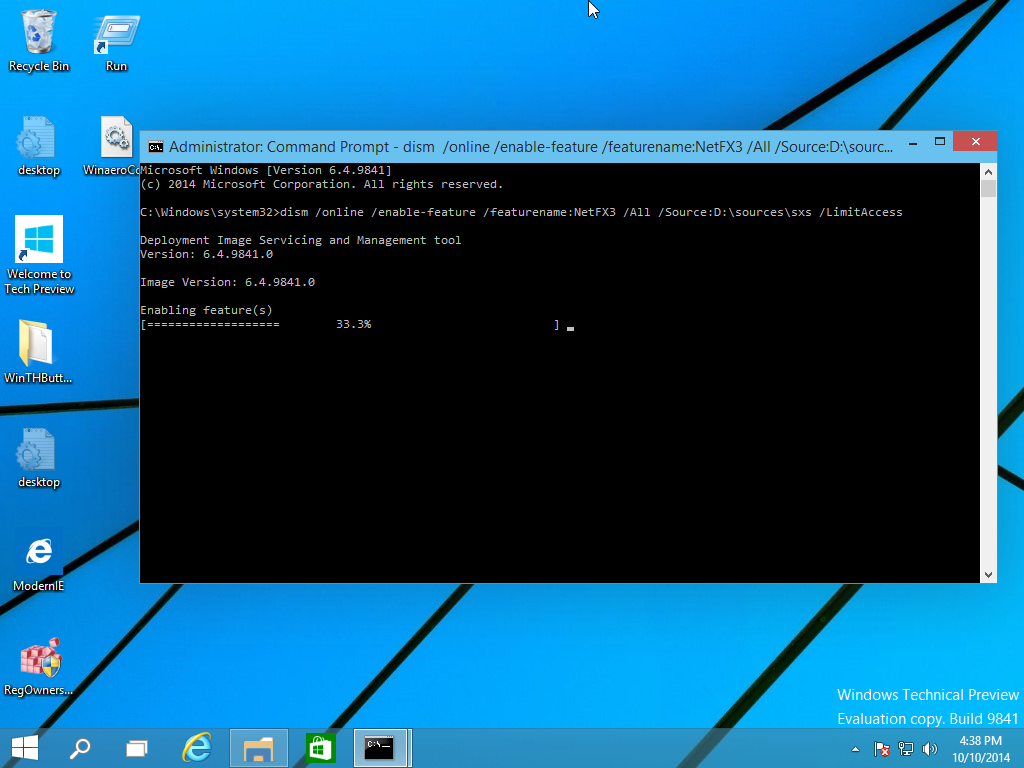
  4. Dism /online /enable-feature /featurename:NetFX3 /All /Source:D:\sources\sxs /LimitAccess
    Replace D: with your drive letter for Windows 10 installation media.dism
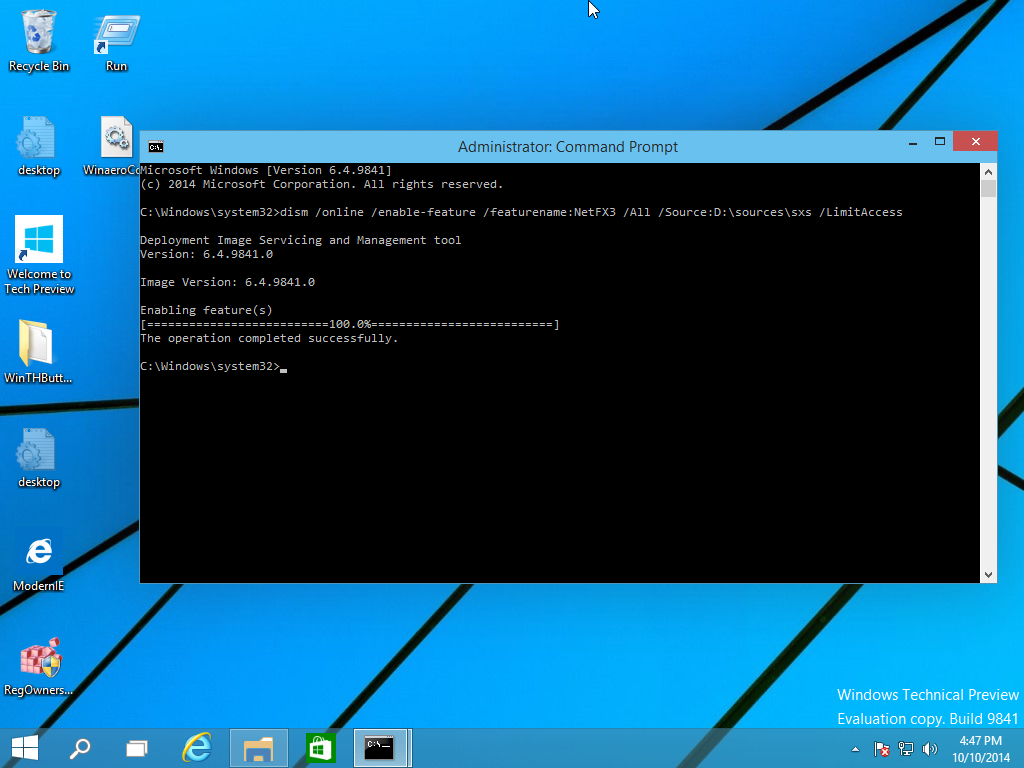
You are done! This will install .NET framework 3.5 in Windows 10.net installed seccessfully
To save your time, I have prepared a simple batch file which will save your time and will find the inserted installation media automatically. It looks like this:

@echo off
Title .NET Framework 3.5 Offline Installer
for %%I in (D E F G H I J K L M N O P Q R S T U V W X Y Z) do if exist "%%I:\\sources\install.wim" set setupdrv=%%I
if defined setupdrv (
echo Found drive %setupdrv%
echo Installing .NET Framework 3.5...
Dism /online /enable-feature /featurename:NetFX3 /All /Source:%setupdrv%:\sources\sxs /LimitAccess
echo.
echo .NET Framework 3.5 should be installed
echo.
) else (
echo No installation media found!
echo Insert DVD or USB flash drive and run this file once again. 
echo.
)
pause
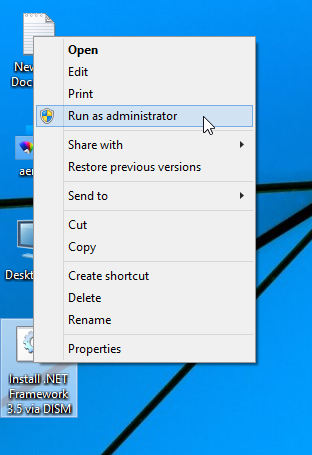
Download the file, extract it from the ZIP archive to the Desktop, right click it and choose Run as administrator. The file will install .NET Framework 3.5 automatically after finding the drive letter of your Windows 10 installation media.
run as administrator
Click here to download the batch file.

Windows 10 build 11082 ISO images

For Windows 10 build 11082, Microsoft doesn't provid official ISO images for clean install. If you're interested in installing this build from scratch, here are few links for you.


At the moment of this writing, Windows 10 build 11082 was released for Fast Ring Insiders only.  There are no official ISO images available.
Here are third party ISO images created from the official ESD files downloaded through Windows Update. You can download them with confidence.
Download Windows 10 build 11082 ISO images
Use the following link to download build Windows 10 build 11082 Pro x64 or x86.
Download
These ISO images were created using genuine Windows Update (esd) files and are not tampered with. Use them to install Windows 10 build 11082 from scratch on your virtual machine or on real hardware.


Generic key for Windows 10 RTM


There is a set of generic keys available for Windows 10 at this moment. These keys are as follows:
  • Windows 10 Home:
    TX9XD-98N7V-6WMQ6-BX7FG-H8Q99
  • WIndows 10 Pro:
    VK7JG-NPHTM-C97JM-9MPGT-3V66T
  • Windows 10 Home Single Language
    7HNRX-D7KGG-3K4RQ-4WPJ4-YTDFH
  • Windows 10 Enterprise:
    NPPR9-FWDCX-D2C8J-H872K-2YT43